CONNEXION
  • RetourJeux
    • Sorties
    • Hit Parade
    • Les + populaires
    • Les + attendus
    • Soluces
    • Tous les Jeux
    • Gaming
  • RetourActu Gaming
    • News
    • Astuces
    • Tests
    • Previews
    • Toute l'actu gaming
  • RetourBons plans
    • Bons plans
    • Bons plans Smartphone
    • Bons plans Hardware
    • Bons plans Image et Son
    • Bons plans Amazon
    • Bons plans Cdiscount
    • Bons plans Decathlon
    • Bons plans Fnac
    • Tous les Bons plans
  • RetourJVTech
    • Actus High-Tech
    • Intelligence Artificielle
    • Smartphones
    • Mobilité urbaine
    • Hardware
    • Image et son
    • Tutoriels
    • Tests produits High-Tech
    • Guides d'achat High-Tech
    • JVTech
  • RetourCulture
    • Actus Culture
    • Culture
  • RetourVidéos
    • A la une
    • Gaming Live
    • Vidéos Tests
    • Vidéos Previews
    • Gameplay
    • Trailers
    • Chroniques
    • Replay Web TV
    • Toutes les vidéos
  • RetourForums
    • Hardware PC
    • PS5
    • Switch 2
    • Xbox Series
    • Switch
    • Pokemon pocket
    • FC 25 Ultimate Team
    • League of Legends
    • Tous les Forums
  • PC
  • PS5
  • Xbox Series
  • Switch 2
  • PS4
  • One
  • Switch
  • iOS
  • Android
  • MMO
  • RPG
  • FPS
En ce moment Genshin Impact Valhalla Breath of the wild Animal Crossing GTA 5 Red dead 2
Forum
  • Accueil
  • Actus
  • Tests
  • Vidéos
  • Images
  • Soluces
  • Forum
Liste des sujets

Fichier autoexec.cfg

[JV]Supersonic
[JV]Supersonic
Niveau 10
18 avril 2013 à 13:56:50

Salut tout le monde , il y a pas longtemps j'ai mis une config dans le fichier autoexec.cfg mais , quand je lance le jeu , il n'y a pas la config...

D'ou vien le probléme ?

Merci d'avance :)

( Si sa a un rapport je suis sur Vista )

Pseudo supprimé
Pseudo supprimé 18 avril 2013 à 13:59:28

C'était quoi la config ? :|

[JV]Supersonic
[JV]Supersonic
Niveau 10
18 avril 2013 à 14:04:08

C'étais celle la ( une config pour moin lag ) :

rate "90000"
cl_showfps 1
cl_cmdrate "66"
cl_interp "0.02"
cl_lagcompensation "1"
cl_updaterate "66"
cl_smooth "1"
cl_smoothtime "0.01"
cl_interp_threadmodeticks "0"
cl_pred_optimize "2"
cl_interp_ratio "1"
mat_queue_mode "-1"
mat_aaquality "0"
mat_antialias "16"
mat_autoexposure_max "0"
mat_autoexposure_min "0"
mat_alphacoverage "0"
mat_bumpmap "0"
mat_bloomscale "0"
mat_bloom_scalefactor_scalar "0"
mat_bufferprimitives "1"
mat_clipz "1"
mat_colorcorrection "0"
mat_compressedtextures "1"
mat_disable_bloom "1"
mat_disable_fancy_blending "1"
mat_disable_lightwarp "0"
mat_disable_ps_patch "1"
mat_debugdepthval "0"
mat_debugdepthvalmax "0"
mat_diffuse "1"
mat_envmapsize "0"
mat_envmaptgasize "0"
mat_fastspecular "1"
mat_fastnobump "0"
mat_filterlightmaps "1"
mat_filtertextures "1"
mat_forceaniso "0"
mat_forcehardwaresync "0"
mat_forcemanagedtextureintohardware "0"
mat_framebuffercopyoverlaysize "0"
mat_hdr_enabled "0"
mat_hdr_level "0"
mat_maxframelatency "0"
mat_max_worldmesh_vertices "0"
mat_mipmaptextures "1"
mat_non_hdr_bloom_scalefactor "0"
mat_parallaxmap "1"
mat_picmip "-2"
mat_reducefillrate "1"
mat_shadowstate "0"
mat_software_aa_blur_one_pixel_lines "0"
mat_software_aa_strength "0"
mat_software_aa_strength_vgui "0"
mat_software_aa_tap_offset "0"
mat_softwarelighting "0"
mat_specular "0"
mat_trilinear "0"
mat_use_compressed_hdr_textures "0"
mat_wateroverlaysize "0"
violence_agibs "1"
violence_hgibs "0"
violence_hblood "0"
violence_ablood "1"
r_ambientboost "0"
r_ambientmin "0"
r_ambientfactor "0"
r_bloomtintg "0"
r_bloomtintb "0"
r_bloomtintexponent "0"
r_bloomtintr "0"
r_cheapwaterend "1"
r_cheapwaterstart "1"
r_drawflecks "0"
r_decals "0"
r_decal_cullsize "0"
r_decalstaticprops "0"
r_dopixelvisibility "0"
r_drawbatchdecals "0"
r_drawmodeldecals "0"
r_dynamic "0"
r_eyes "0"
r_flex "1"
r_forcewaterleaf "1"
r_hunkalloclightmaps "0"
r_lightcache_zbuffercache "0"
r_lightaverage "0"
r_lod "2"
r_maxdlights "0"
r_maxmodeldecal "0"
r_maxnewsamples "0"
r_maxsampledist "0"
r_minnewsamples "0"
r_fastzreject "-1"
r_occlusion "1"
r_PhysPropStaticLighting "0"
r_queued_decals "0"
r_queued_post_processing "1"
r_renderoverlayfragment "0"
r_rootlod "2"
r_ropetranslucent "0"
r_drawdetailprops "0"
r_spray_lifetime "1"
r_shadowmaxrendered "0"
r_shadowrendertotexture "0"
r_3dnow "1"
r_3dsky "0"
r_sse2 "1"
r_shadows "1"
r_teeth "1"
r_threaded_client_shadow_manager "1"
r_threaded_particles "1"
r_threaded_renderables "1"
r_unloadlightmaps "0"
r_worldlights "1"
r_waterdrawreflection "0"
r_waterdrawrefraction "0"
r_waterforceexpensive "0"
r_waterforcereflectentities "0"
cl_clearhinthistory "1"
cl_detaildist "0"
cl_detailfade "0"
cl_drawmonitors "0"
cl_ejectbrass "0"
cl_forcepreload "1"
cl_muzzleflash_dlight_1st "0"
cl_phys_props_enable "0"
cl_phys_props_max "0"
cl_predictweapons "1"
cl_predict "1"
tf_playergib "1"
cl_showhelp "0"
cl_showpluginmessages "0"
cl_show_splashes "0"
cl_rumblescale "0"
cl_debugrumble "0"
cl_playerspraydisable "0"
cl_threaded_bone_setup "0"
cl_threaded_client_leaf_system "1"
cl_ragdoll_collide "0"
cl_ragdoll_fade_time "0"
cl_ragdoll_physics_enable "0"
cl_ragdoll_forcefade "1"
rope_averagelight "0"
rope_collide "0"
rope_smooth_enlarge "0"
rope_smooth "0"
rope_subdiv "0"
rope_wind_dist "0"
sv_forcepreload "1"
jpeg_quality "100000"
mat_monitorgamma "1.8"
commentary "0"
budget_show_history "0"
g_ragdoll_fadespeed "0"
g_ragdoll_lvfadespeed "0"
flex_smooth "1"
props_break_max_pieces "0"
r_propsmaxdist "50"
prop_active_gib_limit "0"
func_break_max_pieces "3"
showhitlocation "1"
mp_decals "0"
gl_clear "0"
muzzleflash_light "0"
lod_transitiondist "0"
overview_mode "0"
adsp_debug "0"
mp_usehwmmodels "0"
mp_usehwmvcds "0"
tf_particles_disable_weather "1"
heapsize "524288"
fils "8"
rate "25000"

exec settings.cfg
exec binds.cfg
clear
echo
echo "+-+-+-+-+-+-+-+-+-+-+-+-+-+-+-+-+-+-+-+-+"
echo "|m0rehighfps : http://m0re.nocrits.com/ |"
echo "+-+-+-+-+-+-+-+-+-+-+-+-+-+-+-+-+-+-+-+-+"

Pseudo supprimé
Pseudo supprimé 18 avril 2013 à 17:16:55

hm, y'a quelques commandes un peu bizarre ( je parle notamment celles à la fin. ), mais ça devrait fonctionner pourtant :/

T'es sur que le fichier autoexec.cfg est bien un txt codé en AINSI ? :3

Pampa-Power
Pampa-Power
Niveau 8
18 avril 2013 à 17:46:12

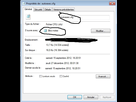
http://puu.sh/2CpNX.png As-tu décoché cet option et renommé l'extension du fichier en .cfg au lieu de .txt ?

[JV]Supersonic
[JV]Supersonic
Niveau 10
18 avril 2013 à 19:48:37

Bha le fichier reste en TXT est ne veut pas changer en CFG , une petit aide ?

[JV]Supersonic
[JV]Supersonic
Niveau 10
18 avril 2013 à 20:20:11

Pampa-power : Comment on va dans le truc affichage ? D'habitude je suis doué mais la... :facepalm:

KaidMath
KaidMath
Niveau 10
18 avril 2013 à 20:23:25

| https://www.jeuxvideo.com/forums/1-2383-9303984-1-0-1-0-fichier-autoexec-cfg.htm#message_9304107
| Ecrit par « [JV]supersonic », le 18 avril 2013 à 19:48:37
| « Bha le fichier reste en TXT est ne veut pas changer en CFG , une petit aide ? »

tu modifies le ".txt" en ".cfg" ? :hap:

[JV]Supersonic
[JV]Supersonic
Niveau 10
18 avril 2013 à 20:25:33

Mais comment ? Putain je suis pas doué...

[JV]Supersonic
[JV]Supersonic
Niveau 10
18 avril 2013 à 22:42:57

Enfaite j'ai beau rennomer le ficher en Autoexec.cfg mon ordi l'identifie en autoexec.cfg.txt...

Comment faire pour le mettre en cfg définitivement ? :)

Pseudo supprimé
Pseudo supprimé 18 avril 2013 à 22:57:16

Tu renomme en autoexec.cfg et tu laisse, ça devrait fonctionner :k

[JV]Supersonic
[JV]Supersonic
Niveau 10
18 avril 2013 à 23:08:44

Comme j'ai dit en rennomant en autoexec.cfg , mon ordi le prend en : autoexec.cfg.txt donc il ignore totalement le .cfg :/

Souslik19
Souslik19
Niveau 10
18 avril 2013 à 23:30:46

T'as un ordi ou un mac?

[JV]Supersonic
[JV]Supersonic
Niveau 10
19 avril 2013 à 09:06:16

J'ai un ordi avec Windows Vista :)

SNIKTARACE3
SNIKTARACE3
Niveau 9
19 avril 2013 à 10:51:39

supprime le .cfg pour .txt

https://image.noelshack.com/fichiers/2013/16/1366361274-autoexeccfg.jpg

essaie de l'ouvrir avec le bloc notes

https://image.noelshack.com/fichiers/2013/16/1366361308-open-blocnotes.jpg

mais à tous les coups fais cque pampa t'as dis de désactiver et ça va marcher

(Panneau de Configuration -> Grandes Icones -> Options des Dossiers -> Affichage (deuxième onglet) -> Décoche le truc

Ez.

[JV]Supersonic
[JV]Supersonic
Niveau 10
19 avril 2013 à 11:05:32

Merci beaucoup , je vais voir si sa marche :)

Fr-F2
Fr-F2
Niveau 9
20 avril 2013 à 14:04:08

Sinon tu fais afficher les extensions et tu modifies le txt en cfg. C'est aussi simple que ça.

Othuum
Othuum
Niveau 8
20 avril 2013 à 16:22:02

Tu peux afficher les extensions dans l'explorateur windows ou dans notepad, faire enregistrer sous, tous les fichiers (*.*), le nommer autoexec.cfg. Avec tous les fichiers (*.*), il ne rajoute rien au nom du fichier.

Sous forums
  • En dessous du forum