Blue Screen sur pc récent

Bonjour,
Depuis désormais quelques jours maintenant mon ordinateur fonctionnant sous windows 10 64 bits me fait des blue screen sans raisons apparentes. Le pc est récent, il date de janvier dernier.
Pour ce qui est de ma config:
z170 pro gaming
i5 6600k
Asus GTX 1060 Dual
Et 8 go de Ram corsair.
Voici les différents blue screen que j'ai eu:
FAULTY HARDWARE CORRUPTED
SYSTEM SERVICE exception
Du coup j'aimerai savoir quels sont les causes, et comment régler ces problèmes. J'ai ouï dire qu'il fallait éviter le démarrage rapide, ce que j'ai fait. Je précise également que depuis quelques temps mon pc ne boot pas tout le temps, je dois souvent appuyer sur le bouton reset de ma tour pour essayer de le relancer...
Merci d'avance
Si tu peux, installe whocrash et poste le rapport complet.
System Information (local)
--------------------------------------------------------------------------------
Computer name: DESKTOP-E6SUVAH
Windows version: Windows 10 , 10.0, build: 15063
Windows dir: C:\WINDOWS
Hardware: ASUSTeK COMPUTER INC., Z170 PRO GAMING
CPU: GenuineIntel Intel(R) Core(TM) i5-6600K CPU @ 3.50GHz Intel586, level: 6
4 logical processors, active mask: 15
RAM: 8496660480 bytes total
--------------------------------------------------------------------------------
Crash Dump Analysis
--------------------------------------------------------------------------------
Crash dump directory: C:\WINDOWS\Minidump
Crash dumps are enabled on your computer.
On Wed 19/07/2017 00:35:06 your computer crashed
crash dump file: C:\WINDOWS\Minidump\071917-8234-01.dmp
This was probably caused by the following module: ntoskrnl.exe (nt+0x16C4C0)
Bugcheck code: 0x3B (0xC0000005, 0xFFFFF8009DD1369D, 0xFFFFAF80C4EBEDC0, 0x0)
Error: SYSTEM_SERVICE_EXCEPTION
file path: C:\WINDOWS\system32\ntoskrnl.exe
product: Microsoft® Windows® Operating System
company: Microsoft Corporation
description: NT Kernel & System
Bug check description: This indicates that an exception happened while executing a routine that transitions from non-privileged code to privileged code.
This appears to be a typical software driver bug and is not likely to be caused by a hardware problem.
The crash took place in the Windows kernel. Possibly this problem is caused by another driver that cannot be identified at this time.
On Wed 19/07/2017 00:35:06 your computer crashed
crash dump file: C:\WINDOWS\memory.dmp
This was probably caused by the following module: ntkrnlmp.exe (nt!KeBugCheckEx+0x0)
Bugcheck code: 0x3B (0xC0000005, 0xFFFFF8009DD1369D, 0xFFFFAF80C4EBEDC0, 0x0)
Error: SYSTEM_SERVICE_EXCEPTION
Bug check description: This indicates that an exception happened while executing a routine that transitions from non-privileged code to privileged code.
This appears to be a typical software driver bug and is not likely to be caused by a hardware problem.
The crash took place in the Windows kernel. Possibly this problem is caused by another driver that cannot be identified at this time.
On Mon 17/07/2017 19:44:23 your computer crashed
crash dump file: C:\WINDOWS\Minidump\071717-6375-01.dmp
This was probably caused by the following module: ntoskrnl.exe (nt+0x16C4C0)
Bugcheck code: 0x12B (0xFFFFFFFFC00002C4, 0x6CC, 0x49315010, 0xFFFFD101FADEA000)
Error: FAULTY_HARDWARE_CORRUPTED_PAGE
file path: C:\WINDOWS\system32\ntoskrnl.exe
product: Microsoft® Windows® Operating System
company: Microsoft Corporation
description: NT Kernel & System
Bug check description: This bug check indicates that a single-bit error was found in this page. This is a hardware memory error.
This is likely to be caused by a hardware problem. This error suggests a case of memory corruption because of a hardware problem. It is suggested you do a test on your RAM modules (memory test).
The crash took place in the Windows kernel. Possibly this problem is caused by another driver that cannot be identified at this time.
On Wed 12/07/2017 14:10:33 your computer crashed
crash dump file: C:\WINDOWS\Minidump\071217-5250-01.dmp
This was probably caused by the following module: nvlddmkm.sys (nvlddmkm+0x4E5DA5)
Bugcheck code: 0x1E (0xFFFFFFFFC000001D, 0xFFFFF8080C905DA5, 0xFFFFB18FCD767080, 0xFFFFF8080C757F68)
Error: KMODE_EXCEPTION_NOT_HANDLED
file path: C:\WINDOWS\System32\DriverStore\FileRepository\nv_dispi.inf_amd64_2386fda73b467ac8\nvlddmkm.sys
product: NVIDIA Windows Kernel Mode Driver, Version 384.76
company: NVIDIA Corporation
description: NVIDIA Windows Kernel Mode Driver, Version 384.76
Bug check description: This indicates that a kernel-mode program generated an exception which the error handler did not catch.
This appears to be a typical software driver bug and is not likely to be caused by a hardware problem.
A third party driver was identified as the probable root cause of this system error. It is suggested you look for an update for the following driver: nvlddmkm.sys (NVIDIA Windows Kernel Mode Driver, Version 384.76 , NVIDIA Corporation).
Google query: NVIDIA Corporation KMODE_EXCEPTION_NOT_HANDLED
On Mon 05/06/2017 22:23:10 your computer crashed
crash dump file: C:\WINDOWS\Minidump\060517-10437-01.dmp
This was probably caused by the following module: ntoskrnl.exe (nt+0x16C310)
Bugcheck code: 0x1E (0xFFFFFFFFC0000005, 0xFFFFF8034826F2AF, 0x0, 0x6000E)
Error: KMODE_EXCEPTION_NOT_HANDLED
file path: C:\WINDOWS\system32\ntoskrnl.exe
product: Microsoft® Windows® Operating System
company: Microsoft Corporation
description: NT Kernel & System
Bug check description: This indicates that a kernel-mode program generated an exception which the error handler did not catch.
This appears to be a typical software driver bug and is not likely to be caused by a hardware problem.
The crash took place in the Windows kernel. Possibly this problem is caused by another driver that cannot be identified at this time.
--------------------------------------------------------------------------------
Conclusion
--------------------------------------------------------------------------------
5 crash dumps have been found and analyzed. A third party driver has been identified to be causing system crashes on your computer. It is strongly suggested that you check for updates for these drivers on their company websites. Click on the links below to search with Google for updates for these drivers:
nvlddmkm.sys (NVIDIA Windows Kernel Mode Driver, Version 384.76 , NVIDIA Corporation)
If no updates for these drivers are available, try searching with Google on the names of these drivers in combination with the errors that have been reported for these drivers. Include the brand and model name of your computer as well in the query. This often yields interesting results from discussions on the web by users who have been experiencing similar problems.
Read the topic general suggestions for troubleshooting system crashes for more information.
Note that it's not always possible to state with certainty whether a reported driver is responsible for crashing your system or that the root cause is in another module. Nonetheless it's suggested you look for updates for the products that these drivers belong to and regularly visit Windows update or enable automatic updates for Windows. In case a piece of malfunctioning hardware is causing trouble, a search with Google on the bug check errors together with the model name and brand of your computer may help you investigate this further.
A ce que j'ai compris, les problèmes viennent de ma RAM et de mes drivers nvidia. Je suis en train de réinstaller mes drivers, qui étaient pourtant à jour... Je vais également faire un Ramtest
En effet oui, tu as un soucis avec un driver Nvidia (mais tu lu'avais déjà remarqué  )
)
Le code 0xC00000012B : The FAULTY_HARDWARE_CORRUPTED_PAGE bug check has a value of 0x0000012B. This bug check indicates that a single-bit error was found in this page. This is a hardware memory error.
Donc soit ta ram, soit ton hdd je dirais (c'est possible d'avoir un peu plus de précision avec d'autre outils)
Le Code 0xC01E/0xC05: A memory access violation occurred (ça doit valoir la peine d'éventuellement tester ta ram)
Mais pense à tester ton disque juste au cas ou.
Le 19 juillet 2017 à 00:52:24 karnax2500 a écrit :
Je précise également que depuis quelques temps mon pc ne boot pas tout le temps, je dois souvent appuyer sur le bouton reset de ma tour pour essayer de le relancer...
Merci d'avance
Justement, j'en reviens au pc qui ne bootait pas il y a quelques temps, cela ne confirmerait pas l'hypothèse de la ram défectueuse? Sachant que l'os est sur un ssd et non un DD.
Pour ce qui est des test, j'étais en train de les faire quand EDF a eu la bonne idée de faire des réparations sur les lignes de courant Je posterai les résultats le plus vite possible.

Désactver le mode fast boot n'est pas dérangeant si on à un ssd quoi qu'il arrive. Sinon oui il vaux mieux le désactiver car sinon tu risques de ne plus voir l'écran titre de ta carte mère. (Et eonc d'y accéder je crois me souvenir).
Test ta ram aussi avec l'outil de diagnostic de windows en tapant diagnostic etc normalement il devrait redémarrer ton ordi puis commençer le test ensuite. Une fois fait tu verras si effectivelent il y à un soucis.
Pour les drivers....hummm peut être qu'ils se sont mal installées ça peut arriver même si c'est bien rare.
Perso là je test voir si les derniers Nvidia n'ont pas un soucis ou si cela provient bien de ma Asus Stryx défectueuse (problème de la vram sur la carte je présume enfin c'est ce que je suscepte vu les Blue screens étranges que j ai eu àcla suite...du momentque je l avais installé).
Bon... au bout d'un quart d'heure de test j'obtiens une erreur. 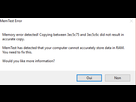
"A number was written to memory, and when that same location was read back, a different number was found."
20':Deuxieme erreur: 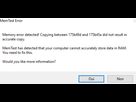
25':Jamais deux sans trois... 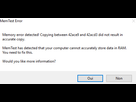
Il semble que tu aies la réponse à ton problème
Le 19 juillet 2017 à 16:00:23 mrkrabs1258 a écrit :
Il semble que tu aies la réponse à ton problème
Le diagnostic Windows n'a révélé aucune erreur... et Ramtest trois...
Le 19 juillet 2017 à 15:31:12 superbegita a écrit :
Désactver le mode fast boot n'est pas dérangeant si on à un ssd quoi qu'il arrive. Sinon oui il vaux mieux le désactiver car sinon tu risques de ne plus voir l'écran titre de ta carte mère. (Et eonc d'y accéder je crois me souvenir).Test ta ram aussi avec l'outil de diagnostic de windows en tapant diagnostic etc normalement il devrait redémarrer ton ordi puis commençer le test ensuite. Une fois fait tu verras si effectivelent il y à un soucis.
Pour les drivers....hummm peut être qu'ils se sont mal installées ça peut arriver même si c'est bien rare.
Perso là je test voir si les derniers Nvidia n'ont pas un soucis ou si cela provient bien de ma Asus Stryx défectueuse (problème de la vram sur la carte je présume enfin c'est ce que je suscepte vu les Blue screens étranges que j ai eu àcla suite...du momentque je l avais installé).
Quels genres de blue screens?
Je m'incruste dans le sujet, j'ai aussi un problème d'écran bleu : https://www.jeuxvideo.com/forums/42-6-52127434-1-0-1-0-bluescreen-dxgmms2-sys-en-jeu-sur-nouvelle-config.htm
J'allais tester ma RAM en rentrant ce soir aussi, mais visiblement les test Windows et RAMTest ne sont pas d'accord 
Quel est l'outil le plus fiable pour être sur que ma RAM est fonctionnelle?

Apparemment cela arrive seulement sur Forza Horizon 3? Dans mon cas c'est apparu sur H1Z1 KOTK et sur une page google chrome random.. Après je n'ai pas tout le temps les mêmes écrans bleus contrairement à toi...
Ramtest reste un outils bien plus performant que celui de windows pour tester ta ram. Si tu as un doute, cherche un troisième logiciel pour tester la ram et voit ce que celui ci va te dire.
https://www.lifewire.com/free-memory-test-programs-2626178
http://listoffreeware.com/free-ram-test-software-windows/ d'autre choix de logiciel
J'ai discuté avec le CM de topachat, au sujet d'un possible renvoi. Voila ce qu'ils m'ont dit: "Si le PC ne boot pas à chaque fois ça peut venir d'un voltage trop bas sur le CPU. Teste quelques jours avec le CPU à sa valeur d'origine"
"Mais comment expliquer ces blues screens et ces erreurs Ramtest ?:"
"Dû à une instabilité de ton OC par exemple ou un système instable à cause d'un Windows corrompu"
Je vais rétablir les paramètres par défaut de mon proco et jouer pendant quelques heures voir si cela fonctionne.
C'est pas impossible non plus (mais t'avais pas dit avant que tu avais fait un OC)
Le 19 juillet 2017 à 17:19:05 mrkrabs1258 a écrit :
C'est pas impossible non plus (mais t'avais pas dit avant que tu avais fait un OC)
Je ne dis pas que tes conseils sont mauvais ! Au contraire même. Tu m'as bien aidé. Je demande conseil le plus possible voila tout!
Je prends rien mal hein et je ne te fais pas de reproche^^ (je dit juste que c'est plus simple d'aider avec toutes toutes les informations ^^ j'aurais pu te poser cette question également) mais t'as bien raison de tenter de t'informer au près du plus de source possible
Bon et bien, ce fut rapide, j'ai remis à zéro mes paramatres dans le bios, pas d'oc ni rien, et j'ai encore eu une blue screen... Kmode exeption not handled
On Wed 19/07/2017 18:06:08 your computer crashed
crash dump file: C:\WINDOWS\Minidump\071917-5031-01.dmp
This was probably caused by the following module: ntoskrnl.exe (nt+0x16C4C0)
Bugcheck code: 0x1E (0xFFFFFFFFC0000005, 0xFFFFF8018FC07355, 0x0, 0xFFFFFFFFFFFFFFFF)
Error: KMODE_EXCEPTION_NOT_HANDLED
file path: C:\WINDOWS\system32\ntoskrnl.exe
product: Microsoft® Windows® Operating System
company: Microsoft Corporation
description: NT Kernel & System
Bug check description: This indicates that a kernel-mode program generated an exception which the error handler did not catch.
This appears to be a typical software driver bug and is not likely to be caused by a hardware problem.
The crash took place in the Windows kernel. Possibly this problem is caused by another driver that cannot be identified at this time.
On Wed 19/07/2017 18:06:08 your computer crashed
crash dump file: C:\WINDOWS\memory.dmp
This was probably caused by the following module: ntkrnlmp.exe (nt!KeBugCheckEx+0x0)
Bugcheck code: 0x1E (0xFFFFFFFFC0000005, 0xFFFFF8018FC07355, 0x0, 0xFFFFFFFFFFFFFFFF)
Error: KMODE_EXCEPTION_NOT_HANDLED
Bug check description: This indicates that a kernel-mode program generated an exception which the error handler did not catch.
This appears to be a typical software driver bug and is not likely to be caused by a hardware problem.
The crash took place in the Windows kernel. Possibly this problem is caused by another driver that cannot be identified at this time.
- Aide à l'achat Mac
- Steam Deck
- Création de sites web
- Création de Jeux
- Linux
- Programmation
- Internet
- Macintosh
- Hardware