[C#] Débutant, comment bien optimiser un programme ?

Salut ! Je débute, et j'ai conçu un programme qui agit comme la calculatrice Windows. Tout fonctionne bien, MAIS :
- J'ai deux "trucs" (objets?) que j'aimerais retirer de mon code (ou les changer de nom), mais je sais pas comment faire 
private void Form1_Load(object sender, EventArgs e)
        {

        }

private void FenetreCalcul_TextChanged(object sender, EventArgs e)
        {

        }
- Puis j'ai mon programme, qui marche bien mais je le trouve horriblement moche, et il est très probablement mal optimisé 
Un screen du résultat final : 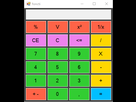
using System;
using System.Collections.Generic;
using System.ComponentModel;
using System.Data;
using System.Drawing;
using System.Linq;
using System.Text;
using System.Threading.Tasks;
using System.Windows.Forms;

namespace Calculatrice_2
{
    public partial class Form1 : Form
    {

        //Variables diverses
        string SChiffreActuel = "";
        float ChiffreActuel = 0;
        float ChiffreMemoire = 0;
        int Operateur = 0;

        public Form1()
        {
            InitializeComponent();
        }


        // ??
        private void Form1_Load(object sender, EventArgs e)
        {

        }

        private void FenetreCalcul_TextChanged(object sender, EventArgs e)
        {

        }

        // Chiffres de 1 à 9 + Virgule
        private void Chiffre0_Click(object sender, EventArgs e)
        {
            FenetreCalcul.Text += "0";
        }
        private void Chiffre1_Click(object sender, EventArgs e)
        {
            FenetreCalcul.Text += "1";
        }

        private void Chiffre2_Click(object sender, EventArgs e)
        {
            FenetreCalcul.Text += "2";
        }

        private void Chiffre3_Click(object sender, EventArgs e)
        {
            FenetreCalcul.Text += "3";
        }

        private void Chiffre4_Click(object sender, EventArgs e)
        {
            FenetreCalcul.Text += "4";
        }

        private void Chiffre5_Click(object sender, EventArgs e)
        {
            FenetreCalcul.Text += "5";
        }

        private void Chiffre6_Click(object sender, EventArgs e)
        {
            FenetreCalcul.Text += "6";
        }

        private void Chiffre7_Click(object sender, EventArgs e)
        {
            FenetreCalcul.Text += "7";
        }

        private void Chiffre8_Click(object sender, EventArgs e)
        {
            FenetreCalcul.Text += "8";
        }

        private void Chiffre9_Click(object sender, EventArgs e)
        {
            FenetreCalcul.Text += "9";
        }

        private void Virgule_Click(object sender, EventArgs e)
        {
            FenetreCalcul.Text += ",";
        }

        //Opérateurs + / - / x / %
        private void Additioner_Click(object sender, EventArgs e)
        {
            ChiffreActuel = float.Parse(FenetreCalcul.Text);
            ChiffreMemoire = ChiffreActuel;
            ChiffreActuel = 0;
            FenetreCalcul.Text = "";
            Operateur = 1;
        }

        private void Soustraire_Click(object sender, EventArgs e)
        {
            ChiffreActuel = float.Parse(FenetreCalcul.Text);
            ChiffreMemoire = ChiffreActuel;
            ChiffreActuel = 0;
            FenetreCalcul.Text = "";
            Operateur = 2;
        }

        private void Multiplier_Click(object sender, EventArgs e)
        {
            ChiffreActuel = float.Parse(FenetreCalcul.Text);
            ChiffreMemoire = ChiffreActuel;
            ChiffreActuel = 0;
            FenetreCalcul.Text = "";
            Operateur = 3;
        }

        private void Diviser_Click(object sender, EventArgs e)
        {
            ChiffreActuel = float.Parse(FenetreCalcul.Text);
            ChiffreMemoire = ChiffreActuel;
            ChiffreActuel = 0;
            FenetreCalcul.Text = "";
            Operateur = 4;
        }

        //Opérations diverses

        private void NegatifPositif_Click(object sender, EventArgs e)
        {
            SChiffreActuel = FenetreCalcul.Text;
            if (SChiffreActuel.StartsWith("-"))
            {
                FenetreCalcul.Text = SChiffreActuel.Substring(1);
            }

            else {  FenetreCalcul.Text = "-" + SChiffreActuel; }

        }

        private void CE_Click(object sender, EventArgs e)
        {
            ChiffreActuel = 0;
            FenetreCalcul.Text = "";
        }

        private void C_Click(object sender, EventArgs e)
        {
            ChiffreMemoire = 0;
            ChiffreActuel = 0;
            FenetreCalcul.Text = "";
        }

        private void RacineCarree_Click(object sender, EventArgs e)
        {
            ChiffreActuel = float.Parse(FenetreCalcul.Text);
            ChiffreActuel = (float)Math.Sqrt(ChiffreActuel);
            FenetreCalcul.Text = ChiffreActuel.ToString();
        }

        private void Carre_Click(object sender, EventArgs e)
        {
            ChiffreActuel = float.Parse(FenetreCalcul.Text);
            ChiffreActuel = (float)Math.Pow(ChiffreActuel,2);
            FenetreCalcul.Text = ChiffreActuel.ToString();
        }

        private void Retour_Click(object sender, EventArgs e)
        {
            FenetreCalcul.Text =FenetreCalcul.Text.Substring(0, FenetreCalcul.Text.Length - 1);
        }

        private void DiviserPar100_Click(object sender, EventArgs e)
        {
            ChiffreActuel = float.Parse(FenetreCalcul.Text);
            ChiffreActuel = ChiffreActuel / 100;
            FenetreCalcul.Text = ChiffreActuel.ToString();
        }

        private void button1_Click(object sender, EventArgs e)
        {
            ChiffreActuel = float.Parse(FenetreCalcul.Text);
            ChiffreActuel = (ChiffreActuel * ChiffreMemoire) / 100;
            FenetreCalcul.Text = ChiffreActuel.ToString();
        }

        //Résultat
        private void Egal_Click(object sender, EventArgs e)
        {
            switch (Operateur)
            {
                case 1:
                    ChiffreActuel = float.Parse(FenetreCalcul.Text);
                    ChiffreActuel = (ChiffreMemoire + ChiffreActuel);
                    FenetreCalcul.Text = ChiffreActuel.ToString();
                    break;
                case 2:
                    ChiffreActuel = float.Parse(FenetreCalcul.Text);
                    ChiffreActuel = (ChiffreMemoire - ChiffreActuel);
                    FenetreCalcul.Text = ChiffreActuel.ToString();
                    break;
                case 3:
                    ChiffreActuel = float.Parse(FenetreCalcul.Text);
                    ChiffreActuel = (ChiffreMemoire * ChiffreActuel);
                    FenetreCalcul.Text = ChiffreActuel.ToString();
                    break;
                case 4:
                    ChiffreActuel = float.Parse(FenetreCalcul.Text);
                    ChiffreActuel = (ChiffreMemoire / ChiffreActuel);
                    FenetreCalcul.Text = ChiffreActuel.ToString();
                    break;
            }
        }
    }
}
- Et enfin, un dernier truc, comment faire du cross-platform ? C'est possible avec Unity, mais est-ce le cas avec VS ? 
MERCI d'avance pour les réponses 

C'est possible d'avoir Xamarin sous Visual Studio pour les cibles multi plateforme.
Le 04 février 2018 à 21:22:36 tbol a écrit :
C'est possible d'avoir Xamarin sous Visual Studio pour les cibles multi plateforme.
Xamarin ?
Faudra que je me renseigne là dessus, merci de l'info 

oui tu peux commencer a extraire du code redondant dans des méthodes
- Aide à l'achat Mac
- Steam Deck
- Création de sites web
- Création de Jeux
- Linux
- Programmation
- Internet
- Macintosh
- Hardware