CONNEXION
  • RetourJeux
    • Sorties
    • Hit Parade
    • Les + populaires
    • Les + attendus
    • Soluces
    • Tous les Jeux
    • Gaming
  • RetourActu Gaming
    • News
    • Astuces
    • Tests
    • Previews
    • Toute l'actu gaming
  • RetourBons plans
    • Bons plans
    • Bons plans Smartphone
    • Bons plans Hardware
    • Bons plans Image et Son
    • Bons plans Amazon
    • Bons plans Cdiscount
    • Bons plans Decathlon
    • Bons plans Fnac
    • Tous les Bons plans
  • RetourJVTech
    • Actus High-Tech
    • Intelligence Artificielle
    • Smartphones
    • Mobilité urbaine
    • Hardware
    • Image et son
    • Tutoriels
    • Tests produits High-Tech
    • Guides d'achat High-Tech
    • JVTech
  • RetourCulture
    • Actus Culture
    • Culture
  • RetourVidéos
    • A la une
    • Gaming Live
    • Vidéos Tests
    • Vidéos Previews
    • Gameplay
    • Trailers
    • Chroniques
    • Replay Web TV
    • Toutes les vidéos
  • RetourForums
    • Hardware PC
    • PS5
    • Switch 2
    • Xbox Series
    • Switch
    • Pokemon pocket
    • FC 25 Ultimate Team
    • League of Legends
    • Tous les Forums
  • PC
  • PS5
  • Xbox Series
  • Switch 2
  • PS4
  • One
  • Switch
  • iOS
  • Android
  • MMO
  • RPG
  • FPS
En ce moment Genshin Impact Valhalla Breath of the wild Animal Crossing GTA 5 Red dead 2
Liste des sujets

[Tkinter] positionner menu

kerrellgame
kerrellgame
Niveau 4
17 août 2016 à 02:31:37

Bonjour, pour commencer voila mon code:

from Tkinter import *

def hello():
	print "Hello"
root = Tk()
root.attributes('-fullscreen', 1)

screensizex = root.winfo_screenwidth()
screensizey = root.winfo_screenheight()

mainframe = Frame(root, height=(screensizey-(screensizey/25)), width=screensizex, bg="#50a9ad")
mainframe.grid(row=0)

menuframe = Frame(root, height=(screensizey/25), width=screensizex)
menuframe.grid(row=1, sticky="w")

startmenu = Menubutton ( menuframe,  text="Start", relief=RAISED, direction="above", width=8, 
	height=1)
startmenu.grid(row=0, column=0)
startmenu.place(relx=0.03, rely=0.5, anchor=CENTER)
startmenu.menu = Menu(startmenu, tearoff=0)
startmenu["menu"] = startmenu.menu
startmenu.configure(font=("Arial", 8, "bold"))

startmenu.menu.add_command(label="Next Day", command=hello)
startmenu.menu.add_separator()
startmenu.menu.add_command(label="Save", command=hello)
startmenu.menu.add_command(label="Load", command=hello)
startmenu.menu.add_separator()
startmenu.menu.add_command(label="Quit", command=root.quit)
startmenu.menu.configure(font=("Arial", 8))

root.mainloop()

Ce que je voudrais obtenir est un menu en bas de la page come ceci:
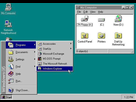
https://image.noelshack.com/fichiers/2016/33/1471393804-windows-95-100609567-large.jpg

Mais j'obtiens ceci:

https://image.noelshack.com/fichiers/2016/33/1471393856-untitled-1.jpg

Le menu flotte au dessus du bouton au lieu d'y etre attache et je n'arrive pas a comprendre pourquoi....

kerrellgame
kerrellgame
Niveau 4
17 août 2016 à 11:38:40

Personne?

kerrellgame
kerrellgame
Niveau 4
17 août 2016 à 22:10:41

up

Sous forums
  • Aide à l'achat Mac
  • Création de Jeux
  • Linux
  • Création de sites web
  • Programmation
  • Internet
  • Steam Deck
  • Macintosh
  • Hardware
La vidéo du moment