Grub: no such device
![[JV]Saeko](https://image.jeuxvideo.com/avatar-md/default.jpg)
sudo: grub-mkconfig: command not found malheureseument
Le 06 avril 2015 à 22:02:11 [JV]Saeko a écrit :
sudo: grub-mkconfig: command not found malheureseument
grub2-mkconfig // avec les arguments de la dernière fois et étant bien dans le chroot
[root@localhost /]# grub2-mkconfig -o /boot/grub/grub.cfg
/usr/bin/grub2-editenv: error: cannot open `/boot/grub2/grubenv.new': No such file or directory.
/sbin/grub2-mkconfig: line 241: /boot/grub/grub.cfg.new: No such file or directory
Le 06 avril 2015 à 22:08:55 [JV]Saeko a écrit :
[root@localhost /]# grub2-mkconfig -o /boot/grub/grub.cfg
/usr/bin/grub2-editenv: error: cannot open `/boot/grub2/grubenv.new': No such file or directory.
/sbin/grub2-mkconfig: line 241: /boot/grub/grub.cfg.new: No such file or directory

// en étant dans le chroot
ls -l /
cat /etc/fstab
Je soupçonne /dev/sdb3 d'être le dossier /boot. Tu te souviens d'avoir fait une partition boot séparée à l'installation de Fedora?
[root@localhost /]# ls -l /
total 4567396
-rw-r--r--.   1 root root    4128768 Apr  6 09:22 0.img
-rw-r--r--.   1 root root 4672782336 Apr  6 09:22 1.img
lrwxrwxrwx.   1 root root          7 Nov 18 13:33 bin -> usr/bin
drwxr-xr-x.   2 root root       4096 Jan 21 21:43 boot
drwxr-xr-x.  21 root root       3780 Apr  6 21:10 dev
drwxr-xr-x. 153 root root      12288 Apr  6 04:20 etc
drwxr-xr-x.   3 root root       4096 Nov 18 13:33 home
lrwxrwxrwx.   1 root root          7 Nov 18 13:33 lib -> usr/lib
lrwxrwxrwx.   1 root root          9 Nov 18 13:33 lib64 -> usr/lib64
drwx------.   2 root root      16384 Dec  3 21:29 lost+found
drwxr-xr-x.   2 root root       4096 Nov 18 13:33 media
drwxr-xr-x.   2 root root       4096 Nov 18 13:33 mnt
drwxr-xr-x.   5 root root       4096 Feb  7 16:13 opt
dr-xr-xr-x. 219 root root          0 Apr  6 21:10 proc
dr-xr-x---.   7 root root       4096 Feb  8 13:03 root
drwxr-xr-x.   3 root root       4096 Apr  6 22:07 run
lrwxrwxrwx.   1 root root          8 Nov 18 13:33 sbin -> usr/sbin
drwxr-xr-x.   2 root root       4096 Nov 18 13:33 srv
dr-xr-xr-x.  13 root root          0 Apr  6 21:10 sys
drwxrwxrwt.   8 root root       4096 Apr  6 22:01 tmp
drwxr-xr-x.  12 root root       4096 Jan 25 22:07 usr
drwxr-xr-x.  22 root root       4096 Apr  6 06:19 var
[root@localhost /]# cat /etc/fstab

#
# /etc/fstab
# Created by anaconda on Wed Jan 21 21:46:56 2015
#
# Accessible filesystems, by reference, are maintained under '/dev/disk'
# See man pages fstab(5), findfs(8), mount(8) and/or blkid(8) for more info
#
/dev/mapper/fedora_localhost-root /                       ext4    defaults        1 1
UUID=25c5ccfb-8cb9-47fa-a1c5-20a832dcabaa /boot                   ext4    defaults        1 2
/dev/mapper/fedora_localhost-swap swap                    swap    defaults        0 0
Hmmm on peut choisir de faire tout toutes les partitions automatiquement a l'installation non? Donc c'est possible. Si je me souviens bien y'a du y avoir trois partitions : " / ", " /swap" et peut etre "/boot" ou "/home"
-rw-r--r--. 1 root root 4128768 Apr 6 09:22 0.img
-rw-r--r--. 1 root root 4672782336 Apr 6 09:22 1.img
C'est ca qui c'est rajoute quand j'ai fait mon erreur et surement tout ce qui date du 6avril, on ne peut plus rien faire si?
Oui, tu as bien un /boot séparé, mais je crois que ton home n'est pas sur une partition séparée.
Donc rebelote :
// en restant dans le chroot
mount /dev/sdb3 /boot
grub2-mkconfig -o /boot/grub/grub.cfg
[root@localhost /]# grub2-mkconfig -o /boot/grub/grub.cfg
/sbin/grub2-mkconfig: line 241: /boot/grub/grub.cfg.new: No such file or directory
[root@localhost /]# grub2-mkconfig -o /boot/grub2/grub.cfg
Generating grub configuration file ...
  /run/lvm/lvmetad.socket: connect failed: No such file or directory
  WARNING: Failed to connect to lvmetad. Falling back to internal scanning.
  /run/lvm/lvmetad.socket: connect failed: No such file or directory
  WARNING: Failed to connect to lvmetad. Falling back to internal scanning.
Found linux image: /boot/vmlinuz-3.19.3-200.fc21.x86_64
Found initrd image: /boot/initramfs-3.19.3-200.fc21.x86_64.img
Found linux image: /boot/vmlinuz-3.19.2-201.fc21.x86_64
Found initrd image: /boot/initramfs-3.19.2-201.fc21.x86_64.img
Found linux image: /boot/vmlinuz-3.19.1-201.fc21.x86_64
Found initrd image: /boot/initramfs-3.19.1-201.fc21.x86_64.img
Found linux image: /boot/vmlinuz-0-rescue-7596b3ac3b9f4d28a6d23b67dfbe9835
Found initrd image: /boot/initramfs-0-rescue-7596b3ac3b9f4d28a6d23b67dfbe9835.img
  /run/lvm/lvmetad.socket: connect failed: No such file or directory
  WARNING: Failed to connect to lvmetad. Falling back to internal scanning.
  /run/lvm/lvmetad.socket: connect failed: No such file or directory
  WARNING: Failed to connect to lvmetad. Falling back to internal scanning.
Found Windows 7 (loader) on /dev/sda1
doneOk, bien joué pour /boot/grub2/grub.cfg !
Bon maintenant : pour faire les choses proprement :
// en étant dans le chroot
umount /boot  && exit
// normalement on est sorti du chroot
umount /mnt/rescue/dev/pts
umount /mnt/rescue/dev
umount /mnt/rescue/sys
umount /mnt/rescue/proc
umount /mnt/rescue
Et redémarre voir ce que ça donne. Mais les systèmes partiellement cassés ça n'est jamais beau à voir ^^'
Oui, je regarde un peu sur d'autres sites et j'ai trouve cette commande 
Je redemarre
EDIT ::: Toujours le meme message au demarrage
Le 06 avril 2015 à 22:49:55 [JV]Saeko a écrit :
Oui, je regarde un peu sur d'autres sites et j'ai trouve cette commandeJe redemarre
EDIT ::: Toujours le meme message au demarrage
Mmh :/
Dans un pastebin, donne-moi l'output de :
dd if=/dev/sda bs=512 count=1 | hexdump -C
//puis
dd if=/dev/sdb bs=512 count=1 | hexdump -C
http://pastebin.com/u5pGrXve
Ok.
sudo grub-install /dev/sdb
Et dans ton BIOS, tu fais en sorte de booter sur deuxième disque dur, celui qui fait 2To
[root@localhost /]# sudo grub-install /dev/sdb
sudo: grub-install: command not found
[root@localhost /]# sudo grub2-install /dev/sdb
Installing for i386-pc platform.
  /run/lvm/lvmetad.socket: connect failed: No such file or directory
  WARNING: Failed to connect to lvmetad. Falling back to internal scanning.
  /run/lvm/lvmetad.socket: connect failed: No such file or directory
  WARNING: Failed to connect to lvmetad. Falling back to internal scanning.
  /run/lvm/lvmetad.socket: connect failed: No such file or directory
  WARNING: Failed to connect to lvmetad. Falling back to internal scanning.
Installation finished. No error reported.
Je teste quand meme de redemarrer.
Changement au démarrage : 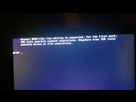
Et quand je fais un ls je vois plus de choses qu'avant : 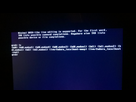
Le 06 avril 2015 à 23:34:11 [JV]Saeko a écrit :
Changement au démarrage :
Et quand je fais un ls je vois plus de choses qu'avant :
Bon, c'est déjà ça...
Sur le live :
mkdir /mnt/fedora  //tant qu'à faire
mount /dev/fedora_localhost/root /mnt/fedora
mount /dev/sdb3 /mnt/fedora/boot
grub-install --root-directory=/mnt/fedora/ /dev/sdb
Ensuite reboot et démarre sur le disque dur 2To.
[root@localhost liveuser]# grub-install --root-directory=/mnt/fedora/ /dev/sdb
bash: grub-install: command not found...
[root@localhost liveuser]# grub2-install --root-directory=/mnt/fedora/ /dev/sdb
Installing for i386-pc platform.
Installation finished. No error reported.
Ca sent plutot bon non? je redemarre
Ça fonctionne !!!!! Merci beaucoup !! Tu es un Dieu ! 

Par contre ma partition s'est presque remplie :[blackout@blackout ~]$ df -h
Sys. de fichiers Taille Utilisé Dispo Uti% Monté sur
devtmpfs 3,9G 0 3,9G 0% /dev
tmpfs 3,9G 96K 3,9G 1% /dev/shm
tmpfs 3,9G 1,1M 3,9G 1% /run
tmpfs 3,9G 0 3,9G 0% /sys/fs/cgroup
/dev/mapper/fedora_localhost-root 43G 42G 0 100% /
tmpfs 3,9G 64K 3,9G 1% /tmp
/dev/sdb3 477M 163M 285M 37% /boot
tmpfs 795M 8,0K 795M 1% /run/user/1000
/dev/sdc1 7,5G 1,4G 6,1G 19% /run/media/blackout/MYLINUXLIVE
C'est bizarre, y'a pas moyen de nettoyer tout ça?
Content pour toi 
Nettoyer ? Ça dépend de ce qui mange de l'espace.
Tu n'as pas un utilitaire graphique genre baobab (Analyseur d'utilisation des disques) ?
Si tu ne peux pas non plus l'installer (mais ça m'étonnerait, il est partout celui-là),
tente un :
sudo du -hs /*
[blackout@blackout ~]$ sudo du -hs /*
4,0M	/0.img
4,4G	/1.img
0	/bin
162M	/boot
244K	/dev
32M	/etc
30G	/home
0	/lib
0	/lib64
16K	/lost+found
4,0K	/media
4,0K	/mnt
322M	/opt
du: impossible d'accéder à « /proc/3809/task/3809/fd/3 »: Aucun fichier ou dossier de ce type
du: impossible d'accéder à « /proc/3809/task/3809/fdinfo/3 »: Aucun fichier ou dossier de ce type
du: impossible d'accéder à « /proc/3809/fd/3 »: Aucun fichier ou dossier de ce type
du: impossible d'accéder à « /proc/3809/fdinfo/3 »: Aucun fichier ou dossier de ce type
0	/proc
111M	/root
du: impossible d'accéder à « /run/user/1000/gvfs »: Permission non accordée
1,4G	/run
0	/sbin
4,0K	/srv
0	/sys
8,0K	/tmp
5,3G	/usr
1,2G	/var
C'est ici le problème : /dev/mapper/fedora_localhost-root 43G 42G 0 100% /
Analyseur de disque : 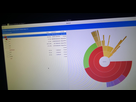
Mes screen font 0ko, je n'ai même plus assez de place pour faire un screen apparemment ^^
- Aide à l'achat Mac
- Macintosh
- Création de sites web
- Création de Jeux
- Linux
- Programmation
- Internet
- Steam Deck
- Hardware