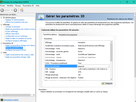
To make changes to Graphics Options you have to hold down the mouse button to confirm.
- For Stuttering, make sure to disable V-Sync and remove the 30FPS Cap.
- Set the game to Borderless Window (might help with alt+tab issues).
- Force Anisotropic Filtering to x16 into your graphics control panel.
- Smoothness Fix 2: In your Graphics Control Panel set Shader Cache to "Off"
- You can remove the Pre-Order Ship in Steam, right click on NMS game properties >DLC>Uncheck
FPS BOOST :
- FPS Boost/Smoothness Fix: Disable G-Sync
Go to : C:\Program Files (x86)\Steam\steamapps\common\No Man's Sky\Binaries\SETTINGS
Then find the file "TKGRAPHICSSETTINGS.MXML" and open it.
You will then find the "GSync" option. It's "true" by default, change it to "false".
I'm personaly running NMS on a computer that doesn't even have the minimum config', i can tell you the FPS boost is absolutely amazing.
Seems to work for most people as well !
FOV EDIT :
.\No Man's Sky\Binaries\SETTINGS\TKGRAPHICSSETTINGS.MXML
<Property name="FoVOnFoot" value="140.000000" />
<Property name="FoVInShip" value="140.000000" />
Message édité le 13 août 2016 à 13:09:48 par XpMGa

![[[sticker:p/1jnh]]](https://image.jeuxvideo.com/stickers/p/st/1jnh)

![[[sticker:p/1kkh]]](https://image.jeuxvideo.com/stickers/p/st/1kkh)



 faut aller ou pour la cache shader ?