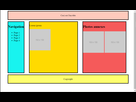
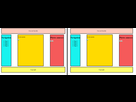
Bonjour, cela fait plusieurs heures que je m'arrache les cheveux, pas moyen de savoir d'où provient ce petit espace à droite de ma 3ème colonne et pourquoi elle n'est pas alignée à droite comme celle de gauche.
Si quelqu'un a une idée 
HTML
<!DOCTYPE html>
<html>
<head>
	<title>Labo_4.1</title>
	<meta charset="utf-8">

	<link rel="stylesheet" type="text/css" href="labo_4.1.css">
</head>
<body>

	<header>Ceci est l'en-tête</header>

	<div id="contenu">

		<nav>
			<h2>Navigation</h2>
			<ul>
				<li>Page 1</li>
				<li>Page 2</li>
				<li>Page 3</li>
				<li>Page 4</li>
			</ul>
		</nav>

		<main>
				<p>Lorem ipsum</p>
				<img src="src/150.png"/>
		</main>

		<aside>
			<h2>Photos annexes</h2>
			<img src="src/150.png"/>
			<img src="src/150.png"/>
		</aside>

	</div>

	<footer>Copyright</footer>

	<script type="text/javascript" src="labo_4.1.js"></script>
</body>
</html>
CSS
html, body
{
	height: 100%;
	margin: 0;
	padding: 0;
}

body
{
	margin-left: 5%;
	margin-right: 5%;
}

#contenu
{
	display: flex;
	height: 65%;
	width: 100%;
	justify-content: space-between;
}

header
{
	height: 10%;
	width: 100%;
	background-color: #ffcabc;

	display: flex;
	align-items: center;
	justify-content: space-around;
}

header, nav, main, aside, footer
{
	border: 3px black solid;
	margin: 5px;
}

nav
{
	background-color: #18F3EF;
}

main
{
	background-color: #FFDA00;
	width: 40%;
}

aside
{
	background-color: #F55A5A;
}

footer
{
	height: 10%;
	width: 100%;

	background-color: #FFFF6E;
	display: flex;
	align-items: center;
	justify-content: space-around;
}