Blue Screen....

J'me suis pris un nouveau pc y'a une semaine et j'me tape 4 blue screen déjà dont 3 d'affiler j'ai donc scanné mon pc avec ESET et j'ai eu 49 menaces qu'il a viré et je viens d'en ravoir un donc j'me dit que ça vient pas de la ...
Ca me la fait sur Youtube 2 fois donc j'me dis que c'est peut être lié a un pilote mal installer .... Adobe ? Cataclyst ? J'suis un peu nouveau dans ce milieu donc je viens demander de l'aide merci 
49 menaces...
Là faut tout formater parce il y en a sûrement d'autres, et même quand tu supprimes les virus il reste toujours les séquelles (modification/suppression des fichiers système par exemple)
J'ai eu pareil sur mon pc portable, et j'ai du le renvoyer au sav, c'etait la carte mère ect defectieux
Tu as surement pareil,
Bin j'ai completement zapper de mettre un anti virus des le debut en fait ... C'est pas un portable c'est une tour .
Y'a pas un autre moyen serieux ? ca va etre chiant de tout reinstaller ...
J'ai l'impression qu'internet est plus lent aussi ... mais je change d'operateur demain je passe de la Fibre Bouygues a SFR donc ptet qu'ils font les crochus sur la co pendant les dernieres heures .
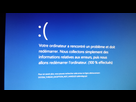
Encore un ...
Non mais là y a pas de doute, faudra tout formater, et la première chose à faire après une installation de Windows c'est d'avoir un antivirus, pense à sauvegarder les choses dont t'as besoin quand même
SYSTEM THREAD EXEPTION NOT HANDLED
KERNEL MODE EXCEPTION NOT HANDLED
These two errors indicate that a program running in the kernel encountered an unexpected condition it could not recover from. They have identical troubleshooting and resolution steps, and you will probably need to use the Windows Debugger to find out what caused the error.
Things to check
If the Blue Screen message mentions a driver or library file, figure out what driver or application that file is part of and update or disable it.
Update the system BIOS to the latest available revision.
Uninstall any recently installed programs, and roll-back any recently installed drivers.
Run diagnostics on the computer's memory.
Je pense que t'a raison ... roooh c'est reloouuuuuuuuuuu putain de connards qui servent a rien :'(
http://www.tomshardware.co.uk/faq/id-1653141/fix-system-thread-exception-handled-error-windows.html
Trouver ca !
- Aide à l'achat Mac
- Macintosh
- Création de sites web
- Création de Jeux
- Linux
- Programmation
- Internet
- Steam Deck
- Hardware