blueScreen très fréquent

bonjour, je viens poster ce topic ce soir car j'ai besoin d'aide
cela fait 6 mois que j'ai monté ma tour
config :
i5 4670k + corsair H60
MSi Z87-G45
12Go G-skill ripjaws X 1600Mhz
GTX 770 ASUS DCU2
SSD kingston V300 120GO
HDD seagate barracuda 1To
alimentation G550M cooler master
HAF 912plus
voilà maintenant 6 mois que ma tour fait des blue screen très fréquemment et pendant une utilisation banale ( youtube, bureautique etc...) cependant jamais eu de bluescreen durant une session gaming
j'ai fait des test de ram avec MEMTEST, aucun problème après 1H
de même avec OCCT aucun problème après 1H de test.
Le logiciel WhoCrashed m'indique que les problèmes ne sont pas du à mes composants.
et mes températures sont toujours correctes (Hardware monitor).
voilà si quelqu'un peut me venir en aide j'apprécierais énormement.
merci d'avance.


dernier up
Le logiciel WhoCrashed m'indique que les problèmes ne sont pas du à mes composants.
Que te dis Whocrashed ?
Crash dump directory: C:\Windows\Minidump
Crash dumps are enabled on your computer.
On Sun 29/06/2014 15:37:29 GMT your computer crashed
crash dump file: C:\Windows\Minidump\062914-4430-01.dmp
This was probably caused by the following module: usbehci.sys (usbehci+0x5CEF)
Bugcheck code: 0xD1 (0xFFFFF88003B2E000, 0x2, 0x1, 0xFFFFF8800FDDBCEF)
Error: DRIVER_IRQL_NOT_LESS_OR_EQUAL
file path: C:\Windows\system32\drivers\usbehci.sys
product: Microsoft® Windows® Operating System
company: Microsoft Corporation
description: EHCI eUSB Miniport Driver
Bug check description: This indicates that a kernel-mode driver attempted to access pageable memory at a process IRQL that was too high.
This appears to be a typical software driver bug and is not likely to be caused by a hardware problem.
The crash took place in a standard Microsoft module. Your system configuration may be incorrect. Possibly this problem is caused by another driver on your system that cannot be identified at this time.
On Sun 29/06/2014 15:37:29 GMT your computer crashed
crash dump file: C:\Windows\memory.dmp
This was probably caused by the following module: usbehci.sys (usbehci+0x5CEF)
Bugcheck code: 0xD1 (0xFFFFF88003B2E000, 0x2, 0x1, 0xFFFFF8800FDDBCEF)
Error: DRIVER_IRQL_NOT_LESS_OR_EQUAL
file path: C:\Windows\system32\drivers\usbehci.sys
product: Microsoft® Windows® Operating System
company: Microsoft Corporation
description: EHCI eUSB Miniport Driver
Bug check description: This indicates that a kernel-mode driver attempted to access pageable memory at a process IRQL that was too high.
This appears to be a typical software driver bug and is not likely to be caused by a hardware problem.
The crash took place in a standard Microsoft module. Your system configuration may be incorrect. Possibly this problem is caused by another driver on your system that cannot be identified at this time.
On Fri 27/06/2014 15:39:25 GMT your computer crashed
crash dump file: C:\Windows\Minidump\062714-4024-01.dmp
This was probably caused by the following module: nsiproxy.sys (nsiproxy+0x2D37)
Bugcheck code: 0x7F (0x8, 0x80050033, 0x406F8, 0xFFFFF880069D0D37)
Error: UNEXPECTED_KERNEL_MODE_TRAP
file path: C:\Windows\system32\drivers\nsiproxy.sys
product: Microsoft® Windows® Operating System
company: Microsoft Corporation
description: NSI Proxy
Bug check description: This bug check indicates that the Intel CPU generated a trap and the kernel failed to catch this trap.
The crash took place in a standard Microsoft module. Your system configuration may be incorrect. Possibly this problem is caused by another driver on your system that cannot be identified at this time.
On Tue 24/06/2014 19:07:20 GMT your computer crashed
crash dump file: C:\Windows\Minidump\062414-6396-01.dmp
This was probably caused by the following module: ntoskrnl.exe (nt+0x75BC0)
Bugcheck code: 0x1E (0xFFFFFFFFC0000005, 0xFFFFF8800C131FA0, 0x0, 0x0)
Error: KMODE_EXCEPTION_NOT_HANDLED
file path: C:\Windows\system32\ntoskrnl.exe
product: Microsoft® Windows® Operating System
company: Microsoft Corporation
description: NT Kernel & System
Bug check description: This indicates that a kernel-mode program generated an exception which the error handler did not catch.
This appears to be a typical software driver bug and is not likely to be caused by a hardware problem.
The crash took place in the Windows kernel. Possibly this problem is caused by another driver that cannot be identified at this time.
On Sat 21/06/2014 17:02:03 GMT your computer crashed
crash dump file: C:\Windows\Minidump\062114-4118-01.dmp
This was probably caused by the following module: nvlddmkm.sys (nvlddmkm+0x83BE4)
Bugcheck code: 0x1000007E (0xFFFFFFFFC0000005, 0xFFFFF8800F11EBE4, 0xFFFFF8800BFE11A8, 0xFFFFF8800BFE0A00)
Error: SYSTEM_THREAD_EXCEPTION_NOT_HANDLED_M
file path: C:\Windows\system32\drivers\nvlddmkm.sys
product: NVIDIA Windows Kernel Mode Driver, Version 340.43
company: NVIDIA Corporation
description: NVIDIA Windows Kernel Mode Driver, Version 340.43
Bug check description: This indicates that a system thread generated an exception which the error handler did not catch.
This appears to be a typical software driver bug and is not likely to be caused by a hardware problem.
A third party driver was identified as the probable root cause of this system error. It is suggested you look for an update for the following driver: nvlddmkm.sys (NVIDIA Windows Kernel Mode Driver, Version 340.43 , NVIDIA Corporation).
Google query: NVIDIA Corporation SYSTEM_THREAD_EXCEPTION_NOT_HANDLED_M
On Thu 19/06/2014 20:15:15 GMT your computer crashed
crash dump file: C:\Windows\Minidump\061914-3978-01.dmp
This was probably caused by the following module: bflwfx64.sys (0xFFFFF88003A594A0)
Bugcheck code: 0xD1 (0x10000018, 0x2, 0x0, 0xFFFFF88003A594A0)
Error: DRIVER_IRQL_NOT_LESS_OR_EQUAL
file path: C:\Windows\system32\drivers\bflwfx64.sys
product: Qualcomm Atheros Bandwidth Control
company: Qualcomm Atheros, Inc.
description: Qualcomm Atheros Bandwidth Control Filter Driver
Bug check description: This indicates that a kernel-mode driver attempted to access pageable memory at a process IRQL that was too high.
This appears to be a typical software driver bug and is not likely to be caused by a hardware problem.
A third party driver was identified as the probable root cause of this system error. It is suggested you look for an update for the following driver: bflwfx64.sys (Qualcomm Atheros Bandwidth Control Filter Driver, Qualcomm Atheros, Inc.).
Google query: Qualcomm Atheros, Inc. DRIVER_IRQL_NOT_LESS_OR_EQUAL
On Wed 18/06/2014 20:21:02 GMT your computer crashed
crash dump file: C:\Windows\Minidump\061814-3822-01.dmp
This was probably caused by the following module: tcpip.sys (0xFFFFF88001609594)
Bugcheck code: 0xD1 (0xFFFFFA8029E509F3, 0x2, 0x0, 0xFFFFF88001609594)
Error: DRIVER_IRQL_NOT_LESS_OR_EQUAL
file path: C:\Windows\system32\drivers\tcpip.sys
product: Système d’exploitation Microsoft® Windows®
company: Microsoft Corporation
description: Pilote TCP/IP
Bug check description: This indicates that a kernel-mode driver attempted to access pageable memory at a process IRQL that was too high.
This appears to be a typical software driver bug and is not likely to be caused by a hardware problem.
The crash took place in a standard Microsoft module. Your system configuration may be incorrect. Possibly this problem is caused by another driver on your system that cannot be identified at this time.
On Fri 13/06/2014 14:41:37 GMT your computer crashed
crash dump file: C:\Windows\Minidump\061314-3790-01.dmp
This was probably caused by the following module: nvlddmkm.sys (0xFFFFF8800F2A5440)
Bugcheck code: 0xD1 (0x78, 0x2, 0x0, 0xFFFFF8800F2A5440)
Error: DRIVER_IRQL_NOT_LESS_OR_EQUAL
file path: C:\Windows\system32\drivers\nvlddmkm.sys
product: NVIDIA Windows Kernel Mode Driver, Version 340.43
company: NVIDIA Corporation
description: NVIDIA Windows Kernel Mode Driver, Version 340.43
Bug check description: This indicates that a kernel-mode driver attempted to access pageable memory at a process IRQL that was too high.
This appears to be a typical software driver bug and is not likely to be caused by a hardware problem.
A third party driver was identified as the probable root cause of this system error. It is suggested you look for an update for the following driver: nvlddmkm.sys (NVIDIA Windows Kernel Mode Driver, Version 340.43 , NVIDIA Corporation).
Google query: NVIDIA Corporation DRIVER_IRQL_NOT_LESS_OR_EQUAL
On Wed 04/06/2014 13:27:31 GMT your computer crashed
crash dump file: C:\Windows\Minidump\060414-3837-01.dmp
This was probably caused by the following module: ntoskrnl.exe (nt+0x75BC0)
Bugcheck code: 0x1E (0xFFFFFFFFC0000005, 0x80, 0x8, 0x80)
Error: KMODE_EXCEPTION_NOT_HANDLED
file path: C:\Windows\system32\ntoskrnl.exe
product: Microsoft® Windows® Operating System
company: Microsoft Corporation
description: NT Kernel & System
Bug check description: This indicates that a kernel-mode program generated an exception which the error handler did not catch.
This appears to be a typical software driver bug and is not likely to be caused by a hardware problem.
The crash took place in the Windows kernel. Possibly this problem is caused by another driver that cannot be identified at this time.
On Tue 03/06/2014 15:18:24 GMT your computer crashed
crash dump file: C:\Windows\Minidump\060314-6427-01.dmp
This was probably caused by the following module: ntoskrnl.exe (nt+0x75BC0)
Bugcheck code: 0xA (0xFFFFFA808DAE8B90, 0x2, 0x1, 0xFFFFF80002C91879)
Error: IRQL_NOT_LESS_OR_EQUAL
file path: C:\Windows\system32\ntoskrnl.exe
product: Microsoft® Windows® Operating System
company: Microsoft Corporation
description: NT Kernel & System
Bug check description: This indicates that Microsoft Windows or a kernel-mode driver accessed paged memory at DISPATCH_LEVEL or above.
This appears to be a typical software driver bug and is not likely to be caused by a hardware problem.
The crash took place in the Windows kernel. Possibly this problem is caused by another driver that cannot be identified at this time.
SVP
Essaies de changer le port pcie de ta carte graphique. Et réinstalles tes drivers
On dirait un conflit de fichiers de tes drivers CG

Salut,
Est-ce que tu utilises chrome? Et genre tu fermes chrome, bam blue screen?
Change tes pilotes graphiques en supprimant bien les anciens pour éviter tout conflits, et essai de virer un barrette de ram.
J'avais les mêmes messages de WhoCrashed, Memtest n'a trouvé aucun problème et pourtant il venait de là. 

On dirait que c'est un pilote système qui fait foirer.
Sauvegardes tes données et ré-installe Windows
Alors pour répondre aux questions j'ai déjà desinstaller et réinstaller les drivers de CG
J'ai pris des blue screen sur chrome et sur Firefox alors que j'étais sur YT etc
J'ai déjà fait une réinstaller de Windows je suis même passer par le Windows 8.1 mais ça ma tellement gonfler que je l'ai virer au bout de 20 minutes pour retourner sur le 7
Désolé du double post une photo de la tout si vous pensez que quelque chose ne va pas dans le montage
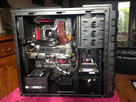
C'est ta ram alors, vire tes barrettes une part une. 
- Aide à l'achat Mac
- Macintosh
- Création de Jeux
- Programmation
- Création de sites web
- Linux
- Internet
- Steam Deck
- Hardware