- Accueil
- Actus
- Tests
- Vidéos
- Images
- Soluces
- Forum
Mod GEM - ( Graphisme )

perso je n'aime pas ce "faux mod" rien de plus q'un réglagle de sweet fx hein.
il est laid, et pas du tout réalisme, il désature totalement la couleur.
certes le filtre du jeu de base est pas énorme, mais j'attend d'autres preset beaucoup mieux que ce " je fou ma saturation de couleur a -50" et j'ai crée un mod hideux digne d'une télé sans couleur.
Totalement d'accord.
Ce sweet FX se résume à dénaturer et brûler les couleurs. Le rendu est encore pire que l'original chez moi.
Non mais allez voir les sweetFX réalisés pour Skyrim ce n'est pas du tout la même qualité 
Ici c'est un sous-sweetFX basse qualité.
Je le pense aussi, mais le sweet FX améliore vachement la qualité avec d'autres réglages, je vous conseille celui-ci
http://www.twcenter.net/forums/showthread.php?618433-Total-War-Rome-II-Clean-and-Sharp-SweetFX
La différence avant-après est juste dingue
jagen tu dois être aveugle ou alors t es un troll.. au choix
railagr meme chose: 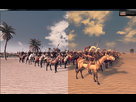

C'est vrai que le résultat peut être très variable, et il est assez difficile d'avoir une configuration ni trop sombre ni trop crue. Malgré tout, on obtient un résultat que je trouve plus réaliste (quand je repasse en vanilla, j'ai l'impression qu'il y a un filtre jaunâtre sur l'image et que les couleurs sont criardes).
Avant : http://img89.imageshack.us/img89/4456/47hi.jpg
Après : http://img822.imageshack.us/img822/2285/9vgj.jpg
Au pire il est possible de désactiver tous les effets sauf, par exemple, les deux AA (qui sont supérieur à ceux du jeu, il me semble bien).
le jeu de base comporte effectivement un filtre jaunâtre horrible que certains apprécient lol. Certains aiment bien aussi les filtrages peu efficace qui laisse plein de pixel partout avec un aliasing a vous exploser la rétine !
Jagen et Railgar95, je ne comprends pas ce que vous reprochez au mod. Je ne l'ai pas testé, mais dans ce qu'on peut voir des screens faits avec, les couleurs sont plus riches, plus "réalistes" (c'est le mot de tout et n'importe quoi j'ai l'impression), y a une plus grande variété dans l'image, ça fait moins "jaune", etc... Franchement, tous les screens et vidéos que je vois avec ce mod sont superbes.
Oh mais tu es un marrant toi .. 
Et c'est nous qui trollons ?
Chez moi ce mod blanchi et brule l'image c'est tout.
Je bricolerai ça se soir.
Attend je n'arrive même plus à voir le rouge des boucliers romains. Ils sont rouge/matron/noir un espèce d'assombrissement les rend toujours très foncé et sombre alors qu'il y a grand soleil.
Point, il n'y a pas de troll.
En même temps, tu critiques le mod, comme quoi il est nul et fait port'nawak, alors que c'est toi qui l'a mal réglé...
Après pas mal de temps à bidouiller les fichiers, je suis parvenu à un résultat tout à fait satisfaisait : il n'y a plus cette effet jaunâtre, les couleurs sont plus vives, l'effet métallique est plus réussis... bref, c'est plus joli, plus réaliste, et après divers test il s'avère que c'est beau quel que soit la météo (alors qu'avant le jeu devenait trop sombre par mauvais temps, par exemple).
Avant : http://img46.imageshack.us/img46/8611/6bcs.jpg
Après : http://img823.imageshack.us/img823/437/ya1w.jpg
J'utilise la dernière version du mod. Maintenant, sa configuration se fait via deux fichiers : GEM_settings.txt et SweetFX_settings.txt.
Voici mes paramètres :
GEM_settings.txt 
/*------------------------------------------------
-----------.
/ Choose effects /
'-------------------------------------------------
----------*/
// Set to 1 for ON or 0 for OFF
- define USE_SMAA_ANTIALIASING 1 //[0 or 1] SMAA Anti-aliasing : Turn off when fps drops
- define USE_FXAA_ANTIALIASING 1 //[0 or 1] FXAA Anti-aliasing : Turn off when fps drops
- define USE_GEMTRUECOLOR 1 //[0 or 1] GEM : Applies GEMShader with true color look. !!Only use one GEMShader!!
- define USE_GEMCINEMATIC 0 //[0 or 1] GEM : Applies GEMShader with cinematic look. !!Only use one GEMShader!!
/*------------------------------------------------
-----------.
/ GEM Graphic-Enhancement-Mod settings /
'-------------------------------------------------
----------*/
// -- General settings --
- define GBlur 2.0 //[0.10 to 2.00] Adjust GEM-Blur (standard 2.0).
- define USE_GBlur 1 //[0 or 1] Force GEM-Blur on or off (standard 1).
// -- GEM True Color settings --
- define GBoostColor 1 //[0 or 1] Enable Saturation.
- define GSat 0.75 //[0.00 to 1.00] Adjust GEM-Saturation (standard 0.75).
- define GTBright 1.13 //[1.00 to 1.16] Adjust GEM-TextureBrightness (standard 1.13).
- define GCBright 1 //[0.00 to 2.00] Adjust GEM-Contrast (standard 0.82).
SweetFX_settings.txt
/*------------------------------------------------
-----------.
/ Choose effects /
'-------------------------------------------------
----------*/
// Set to 1 for ON or 0 for OFF
- define USE_SMAA_ANTIALIASING 1 //[0 or 1] SMAA Anti-aliasing : Smoothens jagged lines using the SMAA technique.
- define USE_FXAA_ANTIALIASING 0 //[0 or 1] FXAA Anti-aliasing : Smoothens jagged lines using the FXAA technique. WIP - Currently only works in DX9 and you need to use the FXAA injector dlls.
- define USE_CARTOON 0 //[0 or 1] Cartoon : "Toon"s the image. (Interferes with SMAA, CRT, Bloom, HDR and Lumasharpen)
- define USE_ADVANCED_CRT 0 //[0 or 1] Advanced CRT : Simulates an old CRT TV display. (Interferes with SMAA, Cartoon, Bloom, HDR and Lumasharpen, and it has a very high performance cost)
- define USE_BLOOM 0 //[0 or 1] Bloom : Makes bright lights bleed their light into their surroundings (relatively high performance cost)
- define USE_HDR 0 //[0 or 1] HDR : Not actual HDR - It just tries to mimic an HDR look (relatively high performance cost)
- define USE_LUMASHARPEN 1 //[0 or 1] LumaSharpen : Also sharpens the antialiased edges which makes them less smooth - I'm working on fixing that.
- define USE_TECHNICOLOR 0 //[0 or 1] TECHNICOLOR : Attempts to mimic the look of an old movie using the Technicolor three-strip color process (Techicolor Process 4)
- define USE_DPX 0 //[0 or 1] Cineon DPX : Should make the image look like it's been converted to DXP Cineon - basically it's another movie-like look similar to technicolor.
- define USE_MONOCHROME 0 //[0 or 1] Monochrome : Monochrome makes the colors disappear.
- define USE_LIFTGAMMAGAIN 0 //[0 or 1] Lift Gamma Gain : Adjust brightness and color of shadows, midtones and highlights (avoids clipping)
- define USE_TONEMAP 1 //[0 or 1] Tonemap : Adjust gamma, exposure, saturation, bleach and defog. (may cause clipping)
- define USE_VIBRANCE 0 //[0 or 1] Vibrance : Intelligently saturates (or desaturates if you use negative values) the pixels depending on their original saturation.
- define USE_CURVES 1 //[0 or 1] Curves : Contrast adjustments using S-curves.
- define USE_SEPIA 0 //[0 or 1] Sepia : Sepia tones the image.
- define USE_VIGNETTE 0 //[0 or 1] Vignette : Darkens the edges of the image to make it look more like it was shot with a camera lens. May cause banding artifacts.
- define USE_DITHER 0 //[0 or 1] Dither : Applies dithering to simulate more colors than your monitor can display. This lessens banding artifacts (mostly caused by Vignette)
- define USE_BORDER 0 //[0 or 1] Border : Makes the screenedge black as a workaround for the bright edge that forcing some AA modes sometimes causes.
- define USE_SPLITSCREEN 0 //[0 or 1] Splitscreen : Enables the before-and-after splitscreen comparison mode.
(Oui, les AA sont activés dans les deux fichiers... dans le doute x) )
bien mieux que l'original mais je trouve ca trop vif du coup ca fait un peu cartoon
C'est une question de goût, je vais peut-être effectivement changer ça^^
Si vous souhaitez des couleurs moins vives, il suffit de changer la valeur de "#define GCBright" dans le GEM_settings.txt (la valeur est de 1 dans mon dernier screenshot).
No offense, mais dans les 3/4 de vos screens c'est plus moche après qu'avant, hein...
C'est classique, à force de faire des réglages on a plus le recul nécessaire pour le voir.
Ah bon ? les dernières de Maeror j'aime bien. Plus que l'original jaunâtre/vert

Sinon vous avez l'option Gamma luminosité + éclat numérique Nvidia ...
C'est contestable, mais pour ma part depuis que j'ai essayé ce mod, je n'arrive plus à trouver les couleurs de bases "attirantes". Le mod est perfectible, mais dans ce cas travaillons ensembles pour le rendre parfait ! Et merci à ceux qui postent leurs réglages, je vais pouvoir tester ça ! hihi

Comme d'ab, ce genre de mod qui fait croire que c'est plus beau en modifiant trop le contraste (déjà un peu le cas avec rome 2 vanilla)...
Breep t as rien compris
tu vois a droite le filtre jaune/rouge dégueulasse c'est avec ca que tu joues. Si tu kiffes ca tant mieux pour toi
Je peux booster aussi les couleurs mais par choix je le fais pas:
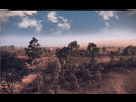
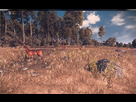
J'attend tes screens de la version vanilla avec impatience pour bien rigoler

Est-ce que cela baisse les fps en jeu ? 