Bonjour à tous !
Je jouer a Minecraft avec mon PC et mon Windows 7, tout aller pour le mieux.. Après tout je joue a des jeux qui demandent plus que minecraft... Bref, j'ai changer mon explorateur Windows et je suis passé en Windows 8 et depuis, lorsque j'essai d'installer minecraft un message d'erreur s'affiche (je signal que rien n'a changé sur mon PC j'ai juste changer mon Windows 7 !!!)
Le message en question :
Bad video card drivers!
-----------------------
Minecraft was unable to start because it failed to find an accelerated OpenGL mode.
This can usually be fixed by updating the video card drivers.
--- BEGIN ERROR REPORT 7fe0271 --------
Generated 27/02/13 22:10
-- System Details --
Details:
Minecraft Version: 1.4.7
Operating System: Windows Vista (x86) version 6.2
Java Version: 1.6.0_07, Sun Microsystems Inc.
Java VM Version: Java HotSpot(TM) Client VM (mixed mode), Sun Microsystems Inc.
Memory: 506261920 bytes (482 MB) / 532742144 bytes (508 MB) up to 1065484288 bytes (1016 MB)
JVM Flags: 2 total; -Xms512m -Xmx1024m
AABB Pool Size: 0 (0 bytes; 0 MB) allocated, 0 (0 bytes; 0 MB) used
Suspicious classes: No suspicious classes found.
IntCache: cache: 0, tcache: 0, allocated: 0, tallocated: 0
LWJGL: 2.4.2
OpenGL: ~~ERROR~~ NullPointerException: null
Is Modded: Probably not. Jar signature remains and client brand is untouched.
Type: Client (map_client.txt)
Texture Pack: Default
Profiler Position: N/A (disabled)
Vec3 Pool Size: ~~ERROR~~ NullPointerException: null[failed to get system properties (java.lang.NullPointerException)]
org.lwjgl.LWJGLException: Pixel format not accelerated
at org.lwjgl.opengl.WindowsPeerInfo.nChoosePixelForma
t(Native
Method)
at org.lwjgl.opengl.WindowsPeerInfo.choosePixelFormat
(WindowsPeerInfo.java:52)
at org.lwjgl.opengl.WindowsDisplay.createWindow(Windo
wsDisplay.java:185)
at org.lwjgl.opengl.Display.createWindow(Display.java
:311)
at org.lwjgl.opengl.Display.create(Display.java:856)
at org.lwjgl.opengl.Display.create(Display.java:784)
at org.lwjgl.opengl.Display.create(Display.java:765)
at net.minecraft.client.Minecraft.a(SourceFile:232)
at asq.a(SourceFile:56)
at net.minecraft.client.Minecraft.run(SourceFile:515)
at java.lang.Thread.run(Unknown Source)
--- END ERROR REPORT d6b6f93f ----------
Et voici les infos de mon pc :
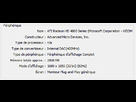
Bref.. Je penses que j'ai largement ce qui faut pour jouer a Minecraft, de plus que sa marchait très bien avant !!!
Merci de proposer des solutions/astuces intelligentes et merci au Jean Kévin de s'abstenir de pourrir ce post, merci !
Extazy620.