Mon dock à changé

Expeditions: Samurai veut révolutionner le RPG tactique avec une aventure entièrement jouable en coop

Mon dock a changé je ne sais comment, il étais normal et puis il est devenu comme ça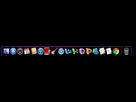
Tu as touché à des trucs dans Onyx ? Tu as pas activé le Dock 2D par hasard ?
Dock 2d ?
c'est bon en fait j'avais entré une commande dans le terminal
Tu rentres des commandes dans le terminal sans savoir ce qu'elles font ? T'as pas peur ?
si mais cétait pour enlever l'effet mirroir du dock

Et du coup ça t'a surpris qu'il n'y soit plus  ?
?

Merci Alli pour ta réponse droite et corrective.
Attention avec le Terninal, il est a prendre avec des pincettes.
De mauvaises commandes peut boulverser ton Mac, alors renseigne toi bien avant d'en exécuter une et cherches avant tout des application pour modifier ton Mac, plutôt que des commandes.
DockDoctor, Refinery, SuperDocker, BumpTop....

J'ai pas compris ta remarque joueur 4 
D'ailleurs en parlant de commandes voici ma liste pour ceux que ça interesse
Chemin dans fenêtre finder :
defaults write com.apple.finder _FXShowPosixPathInTitle -bool YES
Afficher fichiers cachés :
defaults write com.apple.finder AppleShowAllFiles TRUE
Desactiver dashboard :
defaults write com.apple.dashboard mcx-disabled -boolean YES
Empecher la copie du nom complet avec un email :
defaults write com.apple.mail AddressesIncludeNameOnPasteboard -bool false
Notes en demi etoiles dans iTunes :
defaults write com.apple.iTunes allow-half-stars -bool TRUE
Vitesse d'animations mission control :
defaults write com.apple.dock expose-animation-duration -float 0.15
Ajouter un séparateur mobile dans le dock partie droite :
defaults write com.apple.dock persistent-others -array-add '{tile-data={}; tile-type="spacer-tile";}' ;killall Dock
Ajouter un séparateur mobile dans le dock partie gauche :
defaults write com.apple.dock persistent-apps -array-add '{"tile-type"="spacer-tile";}' ;killall Dock
Activer la sélection de texte dans quicklook :
defaults write com.apple.finder QLEnableTextSelection -bool TRUE;killall Finder
Afficher une notification sur l'icône d'itunes lors de changement de morceau :
defaults write com.apple.dock itunes-notifications -bool TRUE
Activer airdrop en ethernet et sur machines non supportés :
defaults write com.apple.NetworkBrowser BrowseAllInterfaces 1
Passer le dock en 2D :
defaults write com.apple.dock no-glass -bool true
Forcer le maintien des touches :
defaults write -g ApplePressAndHoldEnabled -bool false
Desactiver la correction automatique :
defaults write NSGlobalDomain NSAutomaticSpellingCorrectionEnabled -bool false
Afficher la bibliothèque utilisateur dans le finder :
chflags nohidden ~/Library
Possibilité de quitter le finder :
defaults write com.apple.finder QuitMenuItem -bool YES
merci allicroco, ça peut toujours servir.
- Aide à l'achat Mac
- Création de Jeux
- Linux
- Création de sites web
- Programmation
- Internet
- Steam Deck
- Macintosh
- Hardware