Crash SWTOR

Bonjour... J'ai le jour de sa sortie fait l'acquisition de SWTOR. Mon PC n’étant pas assez puissant j'ai acheté un nouveau PC quelque mois après, le jour ou j'obtient mon nouveau PC (1er Mars) mes parents changent d'opérateur... J'ai retrouvé internet aujourd'hui à midi. Je DL swtor et fais les maj, je rentre le code pour mon abo 2 mois, lance le jeu mais il crash un peu après l’écran de chargement... J'ai vraiment besoin d'un coup de main sous peine de commettre un meurtre 
Tes drivers sont à jours ?
Voilà ce que je peux vous donner car je ne connais pas la config exacte :/ 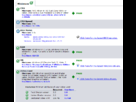
C'est une version légale? 
Oui payer 55 euros en boite ;) Pour les drivers comment puis savoir si ils sont à jour ? je regarde sur DriverAgent la
Télécharge ça: http://www.nvidia.fr/object/win7-winvista-64bit-296.10-whql-driver-fr.html
C'est les drivers graphiques, si tu ne l'avais pas fait ou que tu avais utilisé Windows Update pour ça, tu as sûrement une version pourris qui ne profite pas du tout du matériel, télécharger et installer ça devrait régler le problème.
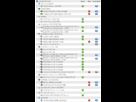
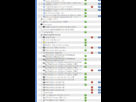
voilà tous les drivers pas à jour...
Je crois avoir déjà DL ses drivers... m'enfin quand j'essaye d'ouvrir le fichier j'ai le message "Non 7-Zip archive"
heu bizarre... Retélécharge-le ptet... Normalement c'est un .exe qui s'extrait et te lance l'installation...
Sinon, c'est pas vraiment fiable le truc de détection des drivers dans le sens où ça cherche la version, mais qui ne correspond pas toujours au même driver (genre à un moment une version "x" obtenu par Windows Update ne correspondait pas à une version "x" télécharger sur le site de Nvidia).
Pour faire simple, si tu fait clic droit sur le Bureau (pas sur une icone, mais sur le fond), est-ce que l'option "Panneau de configuration Nvidia" est présente ? Si elle ne l'est pas, tu n'as pas les drivers Nvidia installé...
Oui l'option panneau de config nvidia est belle et bien la !
Quand tu lance SWTOR, dans le lanceur, clic sur le symbole d'option en bas à gauche, et utilise l'option réparé, ptet qu'un fichier était buggué...
Sinon là je vois pas trop d'où sa viendrais, ta config est parfaitement normal...
Après une recherche sur internet, j'ai trouvé qu'il existait quelques trucs face à des bugs au lancement du jeu:
Problem #2 Star Wars: The Old Republic (SWTOR) Crash Fix – APPCRASH when launching Star Wars: The Old Republic (SWTOR) client
If you’re getting the APPCRASH error when starting Star Wars: The Old Republic (SWTOR), try these fixes:
Possible Solution #1: Disable fullscreen mode
Go to your the folder where you installed Star Wars: The Old Republic (SWTOR)
Look for the file client_defaults.ini and open it
Press Ctrl+F search for the following line: FullScreen=true
Change ‘true’ to ‘false’
Restart Star Wars: The Old Republic (SWTOR)
Possible Solution #2:
Run Star Wars: The Old Republic (SWTOR) in administrator mode. To do this, right-click the .exe or the desktop shortcut of Star Wars: The Old Republic (SWTOR) and select ‘Run as Administrator.’
In case you can’t do above, In XP or Win7, you can also create a new windows profile with administrator access, (name it whatever you want) then find the launcher in explorer and run the game.
Possible Solution #3:
Update your Java software. Check our Technical References for the proper links to the Java Updates.
Possible Solution #4:
Turn your in-game resolution a notch down (1280×800 would be good). Star Wars: The Old Republic (SWTOR) should work smoothly now.
Possible Solution #5:
Make sure you installed Star Wars: The Old Republic (SWTOR) in your main C: Drive with sufficient space.
Possible Solution #6:
Make Star Wars: The Old Republic (SWTOR) recreate your local game data by deleting: C:/Users/…/AppData/Local/
source: http://crashfixes.com/fixing-star-wars-the-old-republic-swtor-crashes-appcrash-errors-freezing-lagging-launch-crash-poor-fps-black-screen-no-sound/ (en version cache par google : http://webcache.googleusercontent.com/search?q=cache:8kHHC0Bt2YcJ:crashfixes.com/fixing-star-wars-the-old-republic-swtor-crashes-appcrash-errors-freezing-lagging-launch-crash-poor-fps-black-screen-no-sound/+http://crashfixes.com/fixing-star-wars-the-old-republic-swtor-crashes-appcrash-errors-freezing-lagging-launch-crash-poor-fps-black-screen-no-sound/&cd=1&hl=en&ct=clnk&client=firefox-a )
Je vais tout essayer ;)Mais je n'ai pas l'option réparer.. Juste le langage :X
OMG les mecs j'ai pas compris mais la d'un coup sa marche... le jeu ne crash plus je suis en jeu la !!! Merci à vous  et désoler du dérangement... merci
- Aide à l'achat Mac
- Macintosh
- Création de sites web
- Création de Jeux
- Linux
- Programmation
- Internet
- Steam Deck
- Hardware